Wednesday, 23 October 2013

HDD Expert checks your hard drive’s health and performance

HDD Expert checks your hard drive’s health and performance

The hard drive is one of the essential parts of most computer systems. What makes it special is that it contains data, so that a hard drive failure or errors can have consequences that are more serious than failures of other PC components.
While those may hurt too, considering that you may buy a new piece of equipment, a hard drive failure may lead to data loss if there are no backups or only partial backups.
Hard drive health monitoring software usually checks SMART data of hard drives that offer many different information including the minimum and maximum temperature, read errors, performance information, and for how many power cycles it has been in use.
HDD Expert is a free software for the Microsoft Windows operating system that comes as a setup and portable version.

HDD Expert Review

If you have downloaded the portable version, you can start it right from the directory it was extracted to. The program displays all hard drives connected to the PC at the time of start under General.
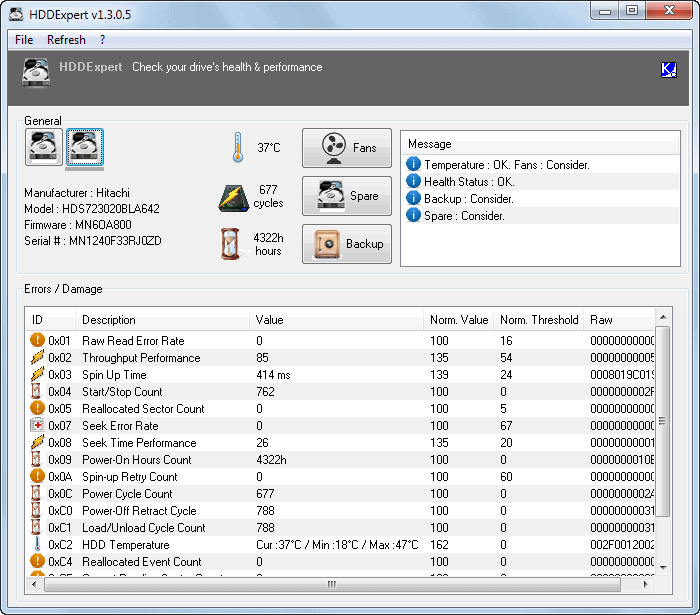
hdd expert
Here you can switch between the hard drives to look at their values. Next to that are important information such as the current temperature reading of the hard drive -- usually 0 for Solid State Drives -- and the number of power cycles and operating hours.
The message pane on the right highlights whether the drive's health status and temperature is ok or not, and also offers suggestions on how to improve the situation. It suggests to create a backup for example, and if temperature reaches critical levels, to consider adding fans to the hard drive.
Side note: The Fans and Spare buttons link to the Amazon website where hard drive fans or spare hard drives can be purchased. The Backup button to the website of the developer where a download software can be downloaded.
The SMART data is displayed under Errors / Damage. The title of the pane is not that appropriate, considering that the data does not necessarily display any errors or damages if the hard drive's health is good.
You can check the error rates here in detail, or simply trust the program's interpretation under Message.
The only other option that HDDExpert provides you with is to enable the automatic refresh feature so that data is refreshed automatically in intervals.

Verdict

The portable program is great for a quick check-up of your hard drives, but lacks notification features so that you need to use it actively when you want to check the health or performance of the connected drives.

Adblock Plus blocks some Facebook annoyances now (if you want)

Adblock Plus blocks some Facebook annoyances now (if you want)

Facebook has been the dominating social networking site on the Internet for the past years. Even Google with all its might did not manage to push its Google+ service past Facebook. While that does not mean that Facebook will still be number one in five years or so, it is fair to say that things won't change anytime soon in regards to being the top dog in the social networking world.
The majority of changes that Facebook makes on its website are controversial, due to the large amount of users and how they use the site. Whenever something changes, you can be sure that part of the user base does not like it and tries everything to stay away from those changes.
The popular -- but also controversial - ad blocking software Adblock Plus can now be configured to block some of the annoyances on Facebook so that you do not see those page elements anymore on the site.

Facebook annoyances

block annoyances facebook
Here is the list of page elements that it can take care of for you:
  • Featured music services
  • Games your friends are playing
  • Game requests or invitations
  • Upcoming events
  • Most shared on page
  • Recently released albums
  • Similar to page
  • Page X is posting about Page Y
  • Page X is similar to Pages you like
  • Like your favorite pages
  • Right sidebar on app/game pages
Tip: You can use the block list in other extensions and programs as well. The list is accessible here. Depending on your extension, you may be able to import it right away -- should work for Adblock Plus forks for example -- or use the style information in programs of your own to remove those elements from Facebook. To add this to Adblock Edge for example, you would click on the extension icon, select Filter Preferences from the context menu, there add filter subscription, then add a different subscription, to add the Facebook annoyances filter list location and subscription title manually to the extension.
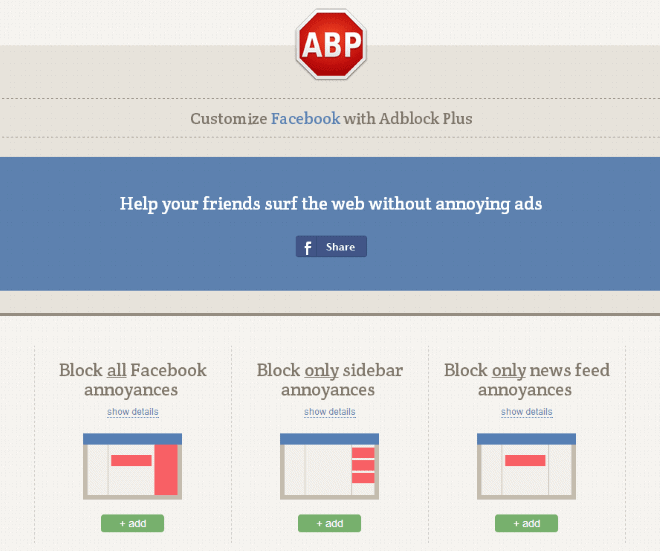
Anyway, if you have installed Adblock Plus, you can head over to the Facebook page on the website to add one of the three available filters to the extension.
Here you can either block all Facebook annoyances, only news feed annoyances, or only sidebar annoyances on the social networking site.

Verdict

If you are a regular on Facebook and annoyed by at least one of the elements that Adblock Plus's new filter list can block for you, then you may want to give this a try either directly from with the ad blocker, or by using the information provided by the list in third party tools such as CSS Adblock or Remove It Permanently for Firefox.

Saturday, 19 October 2013

No big deal: Google supporting Windows XP longer than Microsoft does

No big deal: Google supporting Windows XP longer than Microsoft does

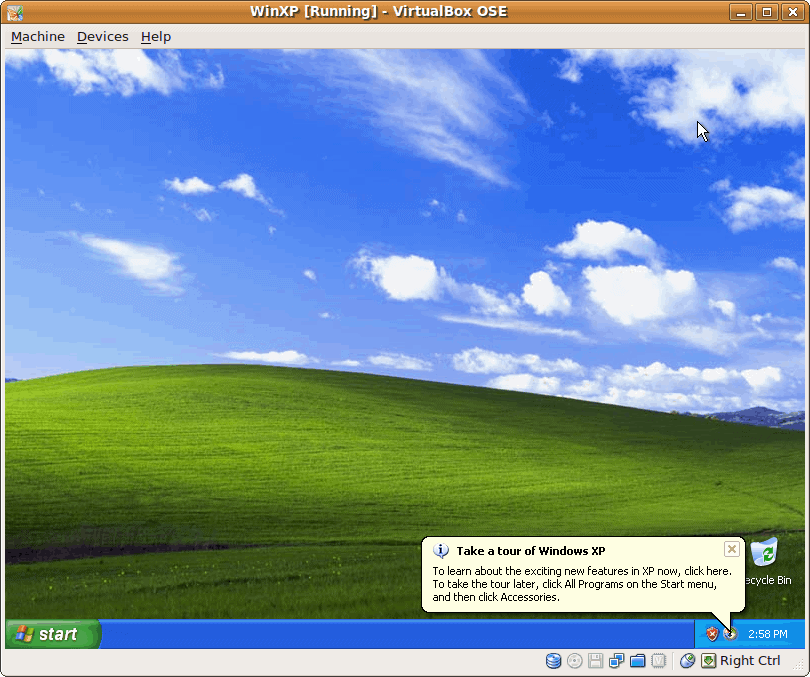
We all know that the days of Windows XP are numbered, and that Microsoft will officially stop support for the operating system in the beginning of 2014 (April 8 to be precise).  What this means is that by then, no support patches will be released anymore by the company.
That does not make Windows XP a dead system the day after end of support, but it may very well make it a very vulnerable system due to unpatched security vulnerabilities.
Some of those may be mitigated with software, or not connecting to the Internet at all. It is however fair to say that it is safer to switch to another -- still supported -- operating system than to keep on using Windows XP.
Almost every tech site under the sun picked up a story that was posted on the official Google Chrome blog today that basically states that Google will support the company's own Chrome browser on Windows XP until April 2015, exactly a year after Microsoft has ended support for the operating system.
The impression that readers may get from those reports is that Google is doing this because they really want to support the XP operating system.For Google, it is great PR and many bloggers and journalists seem to have sided with Google on this one: Google good, Microsoft bad, but is this really a fair assessment?
Figure 3
Figure 3
If you look at the situation closer, you will notice that end of support for an operating system, and end of support for a product running on the operating system are not the same thing.
The most important metric for a software company are its users and which operating systems or products its users are working on. If many are working on Windows XP, it makes a lot of sense to support it at least for a while, even if the operating system itself is no longer supported.
While it is certainly also of interest if an operating system is still supported by the company that created it, it is definitely not the most important metric for individual companies.
Most companies that produce popular programs for Windows won't drop support for Windows XP the minute the operating system is no longer supported by Microsoft. Heck, I can name ten companies that still support earlier versions of Windows even though Microsoft dropped support for it. Or to take it to another level, that support older unsupported versions of Google Chrome with their browser extensions. Does that make Google the bad guy here then?
It makes sense to support a software program on operating systems that are no longer supported, provided that the user base that use the system is large enough. As far as Windows XP is concerned, it is definitely large enough.
Even if Google or other companies drop support for an operating system in the future, it does not necessarily mean that you cannot run the software on it. Much like you can run the operating system after end of support, you will be able to run most applications on that operating system after the companies that produce them end support.
You may not be able to run the latest version of an application, not necessarily, but you will be able to run the software nevertheless.
It will be interesting to see how Microsoft will tackle the situation come 2014. Will it push out notifications to Windows XP users encouraging them to upgrade to a new version of Windows due to the end of support?
What is your opinion on the matter?

Official Facebook application for Windows 8.1 launches

Good news for users of the Windows 8.1 operating system: Facebook just launched its official application for the system so that users of it can now use the official app instead of any of the unofficial ones that were available in store before.
The app is available on all systems that are already running the Windows 8.1 RTM that is officially released tomorrow to the public.
Tip: If you just search for Facebook in store, you will find too many results which makes it really difficult to find the official application. The easiest way to find it is to filter by newest app and to limit the category of apps displayed to social.
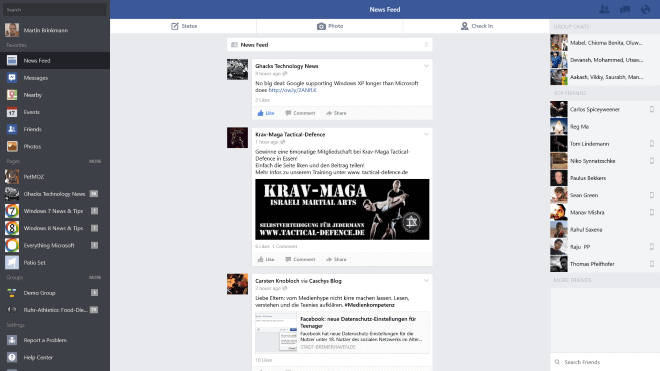
The application itself looks very similar to Facebook's Internet site, but you will notice a couple of differences. The most obvious ones are that the menu on the left is displayed in full at all times, that the search is displayed on top of it and not in the center, and that the right sidebar does not list sponsored ads but a list of group chats and top friends instead

Facebook application

facebook
You find status, photo and check-in tabs at the top for easy access to the functionality, and you will notice that many of the buttons have increased in size to improve the usability of the app on touch devices.
The main question that may come to your mind is this: why would anyone want to use a Facebook app if they can open the Facebook website instead?
The app is optimized for touch, which is a plus as the Facebook website is not. There are other benefits. The app can run in the background and notify you about updates, while you cannot do the same if you have Facebook open in your favorite browser. While you can keep the browser window up at all times, it is not the same as running it in the background.
As far as power consumption goes, the native app may also be more beneficial to your system's battery life, but that needs to be tested in benchmarks first.
You can also share photos posted on Facebook using the Share charm, for instance to attach them to an email that you are about to write. The Share to Facebook does not seem to work right now, or may not have been implemented yet.

Verdict

If you are a regular on Facebook and run Windows 8.1 on a touch device, then you will benefit from the installation of the official Facebook app.
It may be worth a try even if you are not using touch devices, as it provides you with other benefits that you do not get when you run the website version of Facebook.
Windows 8.1 is finally getting a good share of apps for popular services, something that the operating system was missing ever since it launched a year ago

The search for the image format of the future continues

Images are an essential part of nearly every Internet website and service. We have seen progress in other areas of interest in regards to web formats. There is a lot going on when it comes to video formats for example, with new formats promising better quality, lower file sizes and better performance.
When it comes to image formats, the web is still relying on formats that were introduced in the beginning days of the Internet. The popular jpeg image format was introduced back in 1992 while the png image format made its debut in 1996.
These standard formats are supported by all modern web browsers and most websites use them when it comes to displaying images on their sites.
Recently, companies have started to look at successor formats that in regards to jpg, that offer better compression and at the very least an equal image quality.
Google's WebP format is one of those candidates. It is already tested in the wild on Google properties mainly, where the format is served to Chrome users exclusively (if you connect with a different browser, say Firefox, you get png or jpg images instead).
While it is clear that Google will push the company's own WebP format as best as it can, other browser developing organizations and companies are not as quick to adopt. One of the main reason here is that WebP is no the only format that promises better compression ratios.
image format future
Mozilla conducted a study recently that analyzed the compression quality of four different image formats: JPEG XR, WebP, HEVC-MSP, and the standard JPEG format to establish a baseline.  The study itself only looked at the lossy image compression efficiency of said formats, and not at other metrics and data that matters. In particular, it did not include feature sets, performance during run-rime, licensing or time to market in the study.
According to the study, HEVC-MSP performed best in most tests, and in the tests that it was not best, it came in second to the original JPEG format.
Mozilla, which rejected to include the WebP format previously in the Firefox web browser, is still considering adding support for it to the browser, especially since popular third party websites such as Facebook have started to make use of it.
One should not read too much into the study. It is a limited test that looks only at the compression quality and not at other metrics that may be of equal importance.
The quest for the image format of the future continues

Feedly gets 3 new Pro and 3 new Free features

The RSS reading service Feedly has become a popular services in the wake of the Google Reader shutdown. Quite a number of factors attributed to the success of the service: the willingness to listen to the user base, web and application support, an API, and a monetization strategy that generates revenue required to support the service and further development.
While you may not agree with all decisions made, for instance the lack of full article search options or the delivery delay of smaller sites, it is seen by many as one of the best web-based RSS reading services out there.
The company behind the service has announced new features that it has integrated into the service. Three of the features are reserved to Feedly Pro users, while the remaining three new features are available to regular (free) users as well.

Feedly Features

All users benefit from the following three new features that are enabled for all user account levels on the Feedly website.
1. Popular section
feedly popular
What is popular
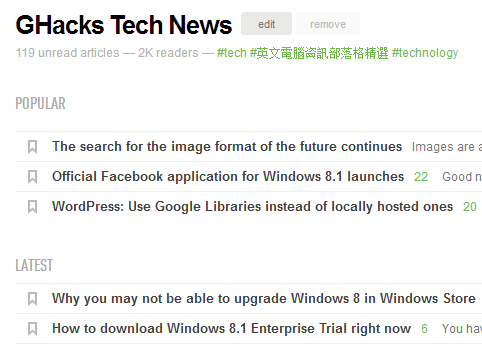
A new popular section is displayed on top of each feed listing popular items based on Feedly community engagement. The new feature is displayed regardless of display style and updated automatically by the service. At the moment, three popular articles are displayed in the section.
Note that these articles are not displayed under latest for the time being.
2. Different Home Views
home views
Feedly Home page
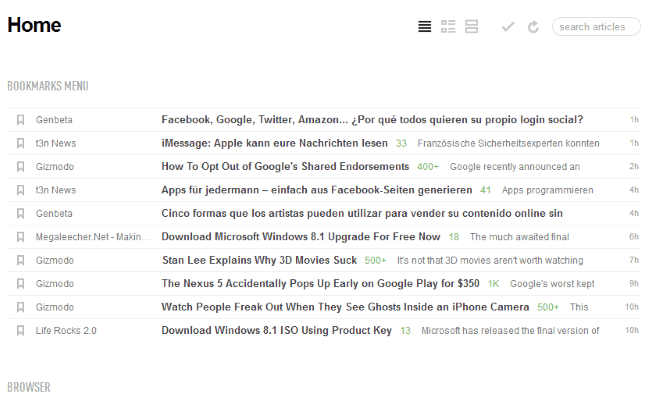
It is now possible to change the home view -- the listing of all subscribed RSS feeds -- to a different view style. If you prefer titles only or cards view, you can change that here now.
3. Improved feed search
The feed search engine has been completely redesigned promising better and more accurate search results no matter if you are searching by title or topic.
It is interesting to note that you may get multiple listings for a single website or service. If you search for ghacks for instance, you get more than ten listings and different subscriber levels.
4. Speed Boost (Pro)
Feeds are refreshed about 30% faster for Pro users according to Feedly thanks to optimizations of the polling speed. Smaller feeds, those with fewer followers, may be updated up to four times faster as well.
5. Custom Sharing (Pro)
The new custom sharing feature enables you to add a custom send to url to your account. You can configure this feature under Preferences > Sharing > Custom Sharing.
The feature uses variables, e.g. $(url) or $(title) that you need to add to the web address of the sharing service that you want to use. A recent blog post on the Feedly blog provides you with examples.
6. Pro Roadmap (Pro)
Pro members can suggest new - pro - features and vote on which features they want the most so that development is prioritized based on those votes.

Thursday, 17 October 2013

Shortcut Keys for Google Search Tools

Shortcut Keys for Google Search Tools

The search tools that Google makes available on search results pages can be quite useful to filter results by time or other factors. While that is great, for instance to limit the results to posts made in the past week or day, it is also not really comfortable to use as you need to click three times before you can make any modifications to those filters.
A click on search tools displays the any time and all results options underneath the main menu bar. You need to click on the selection here, and then again on the filter that you want to make use of.
The Firefox extension Shortcut Keys for Google Search introduces keyboard shortcuts for all time-based options that Google lists under Search Tools. Instead of having to click through, you simply use the shortcut to activate the filter right away.
Here is the list of shortcuts and filters it makes available:
Time Filter
  • Alt-A: set the filter to display results from any time.
  • Alt-H: only display results published in the last hour.
  • Alt-D: display results of the past day.
  • Alt-E: display results of the past week.
  • Alt-M: only display results of the past month.
  • Alt-3 or Alt-6: display results of the past 3 or 6 month period.
  • Alt-Y: past year
  • Alt-C: set a custom range.
The add-on introduces shortcuts that enable you to navigate on the search results page.
Navigation
  • Alt-J or Alt-K: select the next or previous result.
  • Alt-N or Alt-P: go to the next or previous page in the results.
  • Enter: open the selected result in the current tab.
  • Alt-T or Alt-W: open the selected result in a new tab or new window.
There is also a set of "other" shortcuts that you may find useful.
Other
  • Alt-U: display results in your language.
  • Alt-I: display all results.
  • Alt-I: translate foreign pages.
  • Alt-S: toggle the Search tools menu.
  • Alt-F: toggle the time filtering menu.
  • Alt-L: display a help window with all shortcuts.
What I personally like most is the option to quickly set a time filter without having to click through the menu to do so. Just hit one of the available shortcuts and the results page gets reloaded automatically. It can be quite useful if you are using Google Search Tools regularly.