Wednesday, 20 February 2013

New Microsoft.com website launches


New Microsoft.com website launches

By  on September 28, 2012 - TAGS: None
Microsoft back in June 2012 launched a preview of the upcoming Microsoft.com website which looked fundamentally different from the old homepage. Today, the preview design went live onmicrosoft.com. If you visit the website right now, you will notice a clean looking site with less clutter than before.
The responsive design adapts to any screen resolution you display the homepage in. This is a fluent process that happens while you increase or decrease the size of the browser window. The dominant element on the new homepage is the large banner that is advertising Microsoft products and services. Right now, it is teasing Bing it on, Skype and Visual Studio.
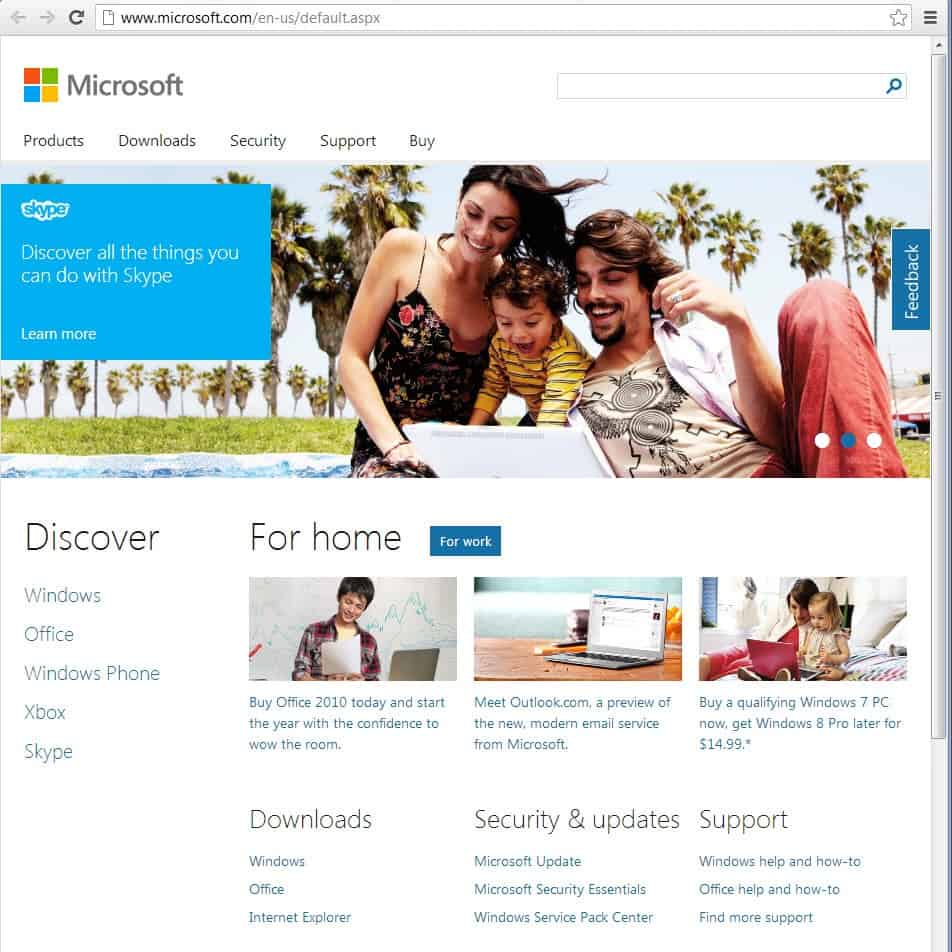
microsoft.com homepage
It is interesting to note that designs differ depending on which web browser you use to access the Microsoft homepage. The above homepage is displayed to Google Chrome, Internet Explorer 10 and Opera users only. Firefox and Internet Explorer 9 and previous users see an entirely different design.
microsoft.com firefox
The design not only looks different, it also is static and not responsive like the design displayed when you open the web page in IE10, Google Chrome or Opera.
The top of the page is nearly identical though in both designs. The search is displayed prominently here, as are the links to products, downloads, security and buy. The first difference is the distinction between home and work on the Firefox and IE9 page. While you can switch between work and home on the IE10 and Chrome design page as well, it won’t change the teaser banner at the top.
It is not really clear why Microsoft decided to launch the site with different designs based on browsers. It is because of technical restrictions, market research or something else?
What’s clear though is that the new Microsoft.com is definitely cleaner and easier to navigate than the old homepage. Have you been to the new homepage yet? Did you see one of the two designs above, or yet another one?

Automatically sort Firefox bookmarks


Automatically sort Firefox bookmarks

By  on September 28, 2012 - Tags:
Firefox bookmarks are not sorted automatically, which may be fine as long as you do not add more than a dozen or so bookmarks to a folder. When the count rises to hundreds, you may however appreciate an option to sort bookmarks in the browser to improve the accessibility.
Bookmarks by default are unsorted in Firefox, which means that new bookmarks are simply added to the end of a folder.  Back in 2007 I explained how you can change the sort order of bookmarks in Firefox manually. For that, you need to load about:config in the browser and edit – or create if it is not existing – the preference browser.bookmarks.sort.direction there. The preference is a string value, and options include setting it to natural to sort bookmarks alphabetically from A to Z, or ascending to sort them from Z to A.
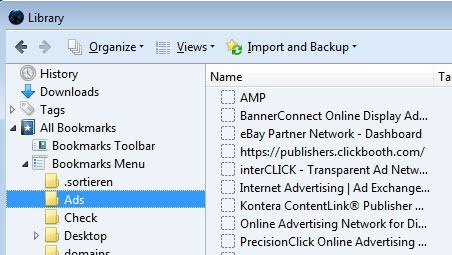
The Firefox add-on Auto-Sort Bookmarks handles the sorting automatically. Once you have installed the extension in the browser you will notice that all bookmarks in Firefox are sorted alphabetically from A to Z. The extension puts folders at the top and bookmarks below the folders by default.
sort firefox bookmarks
You will also notice that you can’t change the order by dragging and dropping bookmarks into other locations. While you can still move them into other folders, you can’t change a bookmark’s position in its current folder anymore.
The extension has no options dialog. What you can use however are about:config parameters to configure some of its functionality. The following parameters are added to Firefox when you install the extension:
  • extensions.sortbookmarks.sortbar – set to true by default. Defines whether bookmarks in the bookmarks bar will be sorted as well.
  • extensions.sortbookmarks.foldersbefore – set to true by default. Puts folders on top of bookmarks in the same structure.
  • extensions.sortbookmarks.autosort – set to true by default. Defines whether bookmarks are automatically sorted or not.
If you are working with lots of bookmarks, you may want to use the manual or automatic sorting options available in the web browser to put order into chaos. Bookmarks stay sorted alphabetically even if you remove the extension from the browser again.

Visual BCD Editor: edit Windows boot manager items


Visual BCD Editor: edit Windows boot manager items

By  on September 23, 2012 - Tags:
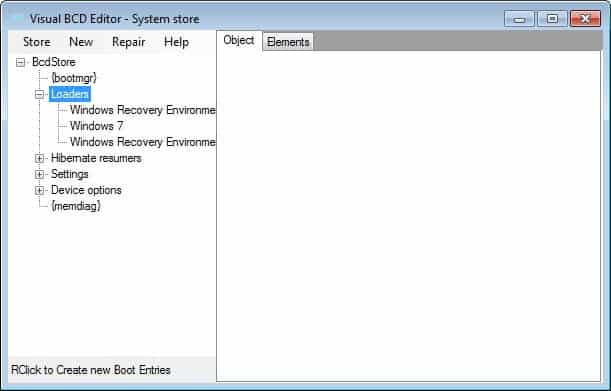
Visual BCD Editor is a free program for Vista and newer versions of the Windows operating system that is enabling you to edit the boot menu of the system. The program displays a visual representation of the BcdStore containing the operating system’s boot configuration data. It displays the structure in a tree-like view on the left sidebar, and the selected item in detail on the right pane.
Here you for instance see all boot loaders currently available with their specific data types allowing you to analyze, verify and edit all boot related parameters. This includes the system root directory and other parameters like the preferred localy or application path for the system loader.
visual bcd editor
More interesting than that may be options to backup and restore the boot storage. Especially the backup option may come in handy, for instance before you start to install a second or third operation system on the computer as it allows you to restore the previous setting if things do not turn out the way they are supposed to be.
To backup the boot information you simply click on store > backup store or press f4. You can then later import the store again by selecting store > import store or by pressing f3. This is also recommended before you make changes to individual boot parameters.
You can furthermore use the program to repair the BCD or boot records, which is an automated process, create missing Windows loaders in case boot loaders are missing from the boot menu, or add Linux/Mac, Windows NT or Vista/7 boot loaders to the list.The program offers capabilities to remove entries from the boot loader as well. This can be useful if you have reinstalled Windows and notice that the old operating system is still listed in the boot manager.
The latest version of Visual BCD Editor requires the Microsoft .Net Framework 2.0. It is fully compatible with all versions of Windows Vista and newer editions of the Windows operating system. You can alternatively check out Easy BCD, another popular boot editor for Vista and newer versions of Windows.

Browser history spam from view.atdmt.com and other networks


Browser history spam from view.atdmt.com and other networks

By  on September 24, 2012 - Tags:
Browser history spam refers to scripts messing up the current tabs history by polluting it with script related entries so that the web pages that have been visited before are moved down the queue or even completely removed from the history when the limit is reached. It is not really clear if that is done on purpose, or if those scripts have a programming flaw that is causing the behavior. As far as I know, this is only happening in Microsoft’s Internet Explorer and not in other web browsers at all.
A few advertising services are mentioned regularly when it comes to this kind of spam: http://view.atdmt.com/ belonging to Atlas Solutions which is part of Microsoft,  http://apr.lijit.com which is part of Federated Media, and http://googleads.g.doubleclick.net which is Google’s advertising network. All three are legit networks, which suggests that individual apps are causing the issue.
It should be a temporary issue, as these kind of ads should get reported quickly to the advertising networks and then removed as a consequence from the network’s inventory.
So how can you overcome the issue in the meantime? There are several options:
  • Switch to a different web browser, e.g. FirefoxGoogle Chrome or Opera
  • Use an ad blocker like Adblock IE
  • Block the ad networks using the hosts file
  • Try reloading the page with F5. Users have reported that this removes the ad entries from the history
  • Add the networks to the list of restricted sites in Internet Explorer. This is done with a click on the settings button and the selection of Internet Options from the menu (in IE9, may be different in previous versions of Internet Explorer). Switch to the security tab, click on restricted sites, then the sites button, and add the networks that are causing the issue to the list there.
I’d probably start with the reloading option and keep using it unless you run into history spam fairly frequently.

Monday, 18 February 2013

uTorrent 3.3 alpha randomizes Peer-ID during sessions


uTorrent 3.3 alpha randomizes Peer-ID during sessions

By  on September 22, 2012 - Tags:
It is almost certain that public – and likely private – Bittorrent traffic is monitored to a great extent by companies that specialize in these kind of operations. Information such as IP addresses, downloaded files, date and time, program name and version, and other information are likely recorded by these companies. Most users know that it is the IP address that makes them identifiable, and some take great care to anonymize their online presence because of this. There are several options to do just that, from using virtual private networks or proxy servers to seedboxes or open wireless networks.
Fingerprinting techniques may however reveal connections even if an IP address is changed regularly. Bittorrent clients are for instance sending out a peer-ID on connects which may or may not get randomized automatically by the application. The popular uTorrent application for instance up until now randomized the peer-ID on every start of the program, but not during sessions.
The peer-ID in this case may reveal links between seemingly unrelated user sessions. This is for instance the case if you have changed your IP during a session but not restarted the uTorrent client.
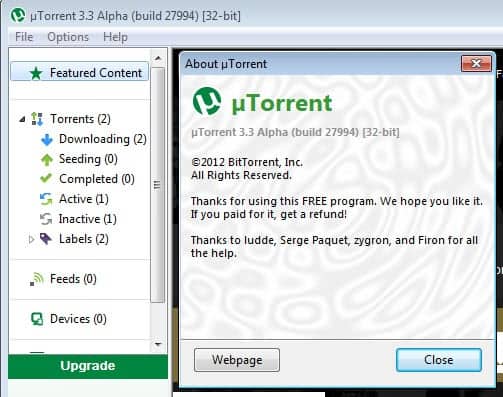
utorrent 3.3 alpha
To avoid this from happening, Bittorrent INC. has added a new feature to the uTorrent 3.3 client that is randomizing the peer-ID for public torrent downloads during sessions.  The feature has been enabled in one of the latest alpha builds of the client to mitigate tracking using the ID.
Feature: don’t use a consistent peer-id (to mitigate tracking)
Other Bittorrent clients have had implemented similar measures for some time now. The popularuTorrent alternative qbittorrent for instance supports an anonymous mode feature that is taking anonymity a step further:
  • peer-ID without client fingerprint
  • user-agent will be empty
  • trackers will only be used if they are using proxy servers
  • listen sockets are closed
  • incoming connections only accepted though Socks5 or I2P proxy
It is not really clear when the current stable version of uTorrent will be moved to version 3.3. Considering that it is currently in alpha it may take a while before stable users benefit from the protection.
You find a download link of the latest uTorrent alpha build on the official forum where updates are regularly posted. Keep in mind that it is an alpha and may be less stable because of it. (via Reddit)

Check if a website is banned from Adsense


Check if a website is banned from Adsense

By  on September 21, 2012 - TAGS: None
You need to be very careful when you buy websites or domains. You not only need to verify the claims made by the current owner of the website but also do extra research to find out more about the owner, domain and website. Some of the things that you may want to verify are for instance whether the content on a website is unique, if the traffic and revenue figures are correct, or whether the website has previously been manually or automatically punished by Google or another company.
If you do not see Adsense ads on the site but plan to run them once you have made the purchase, you also may want to check if that is possible or not. Adsense ads don’t display on sites that have been banned by Google, even if you add code to the site that is working on other websites.
But how do you find out about it without relying solely on the owner of the site? The Google Adsense Sandbox can help you in this regard. Just visit the website, enter the domain name or website url that you want to verify, pick a country, and click on preview ads.
If you see advertisement then the site is not banned by Google and can display Adsense ads after all. If you do not see ads, it is likely that Google has banned the site from the Adsense program. If that is the case, you could still try and reapply, but that is usually only successful if you fix the issue that got the site – or Adsense account – banned in first place. Knowing that a website has been banned from Adsense can give you additional leeway in the negotiations on the other hand.
You can use the tool to display other Adsense related information, like previewing ads to make sure the ads are appropriate for the content a site is offering.
It is a great tool all in all that buyers should use to quickly check if they can’t see Adsense ads on a particular domain or website they are interested in.

Internet Explorer security updates released [September 2012]


Internet Explorer security updates released [September 2012]

By  on September 21, 2012 - Tags:
0-day vulnerability affecting all versions of Microsoft Internet Explorer except version 10 on all supported Microsoft operating systems was revealed recently. Microsoft, aware of limited attacks targeting the vulnerability, promised to release an out of band patch for the vulnerability to protect Internet Explorer users from exploits making use of it.
Internet Explorer users have to visit a specially prepared website where the attack is carried out on. A successful attack may give the attacker the same user rights as the user working locally on the computer. It became known that different types of attacks were carried out of which some dropped a trojan on the system.
Internet Explorer users can mitigate the issue by installing Microsoft’s Enhanced Mitigation Experience Toolkit and configuring it to protect Internet Explorer from exploits. Other options that Microsoft suggested to customers was to change the security zone of the Internet and Intranet to high.
A Fix It has been released yesterday that patches the vulnerability on Windows systems, with the promise to release a full patch today.The promised patch has now been released by Microsoft. Windows users can either use the operating system’s built-in Windows Update tool to check for the patch and install it on the system, or download the patch from Microsoft’s Download Center instead once it is released there.
internet explorer security update
This security update resolves one publicly disclosed and four privately reported vulnerabilities in Internet Explorer. The most severe vulnerabilities could allow remote code execution if a user views a specially crafted webpage using Internet Explorer. An attacker who successfully exploited any of these vulnerabilities could gain the same user rights as the current user. Users whose accounts are configured to have fewer user rights on the system could be less impacted than users who operate with administrative user rights.
This security update is rated Critical for Internet Explorer 6, Internet Explorer 7, Internet Explorer 8, and Internet Explorer 9 on Windows clients and Moderate for Internet Explorer 6, Internet Explorer 7, Internet Explorer 8, and Internet Explorer 9 on Windows servers. Internet Explorer 10 is not affected. For more information, see the subsection, Affected and Non-Affected Software, in this section.
The PC needs to be restarted once the update has been downloaded and installed on the system to apply it fully. You find additional information about the security update on the Security Bulletinpage on Microsoft.com.
Microsoft in addition has released an update for the integrated Flash Player in Internet Explorer 10 on Windows 8 that is also fixing security vulnerabilities. The update is available via Windows Update or on Microsoft’s Download Center.
internet explorer 10 flash update fix
Here it is available for Windows Server 2012, the Windows Server 2012 Release Candidate, the Windows 8 RTM release, and the Windows 8 Release Preview.