Friday, 1 February 2013

Fix Google Chrome crashes and hangs


Fix Google Chrome crashes and hangs

By  on September 10, 2012 - TAGS: None
I have not really noticed any crashes or hangs in Google Chrome, or other web browsers for that matter, in recent time. That said, I do know of a few users who are experiencing crashes in the browser, either because they emailed me asking for help, or because I know them personally and they have mentioned issues to me.
Even though Chrome is running fine for the majority of users, it too has issues of its own. From too high memory usage to sound issues and ads in the browser to the dreaded Oops! Google Chrome could not connect to error.
Chrome users may experience crashes when they are running third party software that is not compatible with the web browser. It can be that an older version is outdated, or that even the latest version of an application is not compatible with the browser.
Software incompatibilities are the primary reason for crashes and hangs in the Chrome browser. Many of the issues can be resolved with updates, but since you do not know which program to update, it is recommended to update them all. Try a program like the software updates monitor Sumo to find out which of your programs need updating.
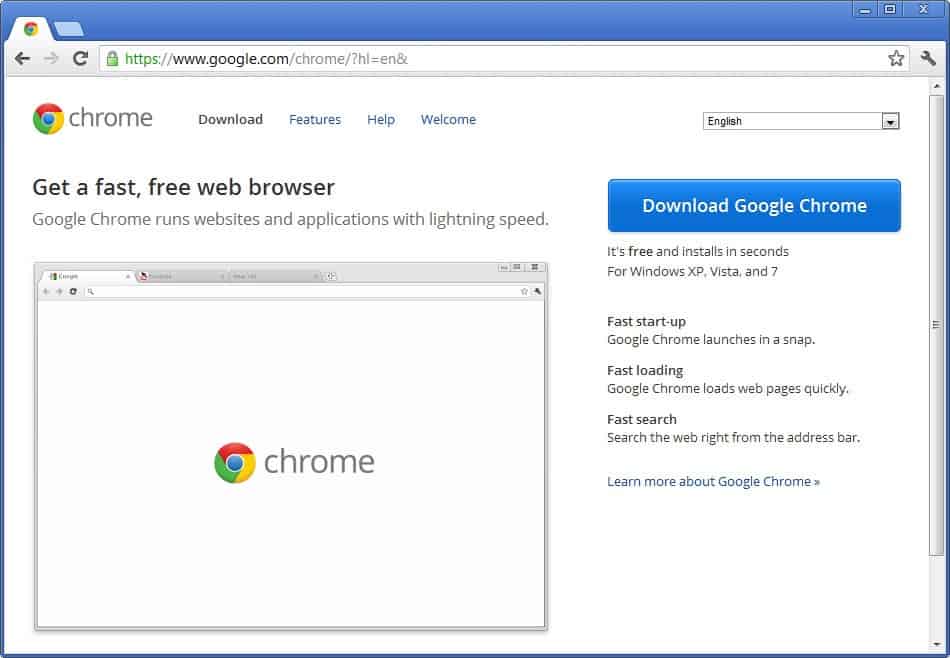
google chrome
Usually it is an app that is running at the time Chrome is running or an app that is somehow integrated into the browser. This can be a security software, a download manager, or a desktop app that runs all the time on the computer.
The following list highlights applications that may cause Chrome to crash or hang.
  • Internet Download Manager (IDM) – This issue is caused by outdated versions of Internet Download Manager. If you are running IDM 6.02 or earlier, you may experience crashes in the Google Chrome web browser. To resolve, update the program to the latest version (at the time of writing that is 6.12). You can alternatively disable advanced browser integration under Options > General in IDM.
  • Asus EeePC print crash – Asus EeePC owners that have Asus WebStorage installed my experience print crashes in Chrome. This too is caused by an outdated program version which you can resolve by updating Web Storage to the latest version.
  • Stopzilla (iS3 Anti-Spyware) may cause Chrome to crash. Google suggests to update the program to the latest version to see if it resolves the issue. If not, disabling or uninstalling is an option.
  • NVIDIA Network Access Manager is incompatible with Chrome. Suggested actions are to temporarily disable the software
  • The performance optimization and monitoring application NVIDIA nTune is incompatible with Google Chrome. Temporarily disabling may resolve the issue.
  • NVIDIA Desktop Explorer is also incompatible with Google Chrome. This is caused by the nvshell.dll which you may want to remove from the system. Alternatively, disable or uninstall the desktop manager.
  • ESET Nod32 Antivirus – Earlier versions of the antivirus software are incompatible. If you are running version 2.7 or earlier you may notice crashes in Chrome. Solution: update to the latest version or disable Internet monitoring.
  • Hide My IP may cause crashes in Google Chrome. Disable for the time being or check for updates to see if it resolves the crash issues.
  • Venturi Firewall can crash Chrome as well. Try updating the desktop firewall to see if it resolves the issue. If not, disabling or uninstalling may be the only option if you want to continue using Chrome.
  • WinMount, a program to compress and decompress archives and to mount archives on the system, appears to be incompatible with Chrome. You may try and update the software, or if that does not work, disable it instead.
  • PPLive, a live video streaming software, may cause Chrome to hang or crash. To resolve, update to the latest version. If issues remain, disable the integration in Chrome.
  • Folder Size
  • Profile corruption. If Chrome crashes seconds after opening, or get “Aw Snao” error messages all the time, your profile may be corrupt. Follow the instruction posted here to create a new default profile to see if it resolves the issue.
  • Other software that may crash Google Chrome: Safe Eyes Parental Control Software, ContentWatch, Microsoft Office XP Input Method Editor,Naomi Web Filter,Trusteer Rapport. Try updating first, if that does not help, disable or uninstall.
If you can’t find a solution and do not want to or can’t uninstall or disable the application causing the issue, you may want to post in the official Chrome support forum to get help with the issue.

How to protect your privacy on the Internet


How to protect your privacy on the Internet

By  on September 7, 2012 - Tags:, , 
With UK parties proposing to monitor the activities of all country residents come new fears of an 1984-esque government that with a single mouse click can find out everything there is to know about its citizens. When you look at what is openly proposed in non-totalitarian countries, and the monitoring that happens without the public knowing, you’d better be prepared to take your privacy into your own hands.
If the charter passes, UK ISPs and phone providers will be required to record information about the Internet, text (as in SMS) and email use of all British residents. While that does not include contents, it does include the visited Internet sites, and the people that UK residents have contacted via email or text messages. The data must be retained at least for a 12 month period before it can be deleted.

Protecting your privacy

Here is a set of options that you have to protect your privacy on the Internet and when using your mobile phone.


  • Privacy related browser extensions: Extensions like HTTPS Everywhere or Perspectives can improve your privacy while you are browsing the Internet.
  • Proxies: A proxy server disguises your IP when you make connections. Your ISP would for instance only see your connection to the proxy server and not the actual destination on the web that you are connecting to. This is of course only true if the proxy is configured correctly. Browser extensions like Proxilla or Go2 Proxy make the process more comfortable. You can alternatively check out this free web proxy list or use http / socks proxies instead.
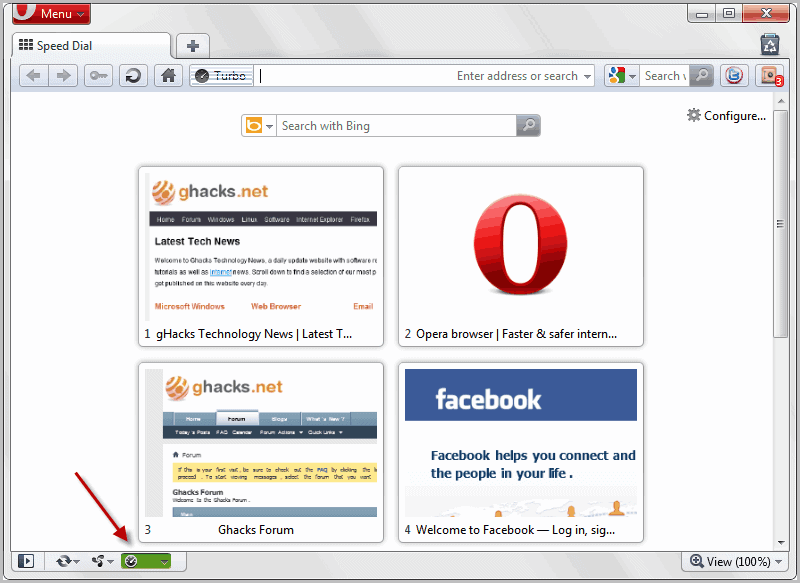
  • Opera Turbo: This is a feature of the Opera browser that redirects all of the browser’s traffic through an Opera server. It works like a proxy, but with the added benefit that traffic is compressed on the server to reduce bandwidth costs. While initially designed for low speed Internet connections and pay by traffic plans, it can be used as a proxy. And Opera Turbo is maintained by a reputable company.
opera turbo on
  • Virtual Private Networks (VPN): VPNs are without doubt the most comfortable and secure option. You establish an encrypted connection to the VPN provider so that spying is stopped in its tracks. The sites you connect to only see the IP of the VPN provider and not your own so that you can’t be monitored this way as well (unless you happen to share or leak information on the sites). VPNs come at a cost, usually between $5 to $10 per month.It is recommended to pick a VPN provider that is not operating from the country you are living in, or that has ties to the country as the provider may be obligated by law to record your traffic. Most smartphones support VPN connections as well so that this is taken care of when you sign up for a virtual private network, provided you configure your phone to connect to it.
  • Tor: Tor routes your Internet traffic through several servers that only know the server before and after them in the chain. Tor is free to use, and you can download a variety of tools and programs to use it on your devices. Tor is not only available for desktop computers, but also for Android. The downside is that you can’t use TOR that well for for activities that require lots of bandwidth.
  • Encryption / email: If you are using a VPN, then traffic to and from your email provider is automatically encrypted as well. You can alternatively encrypt your emails in Linux or in Thunderbird. Remember that the methods are only effective if all involved parties encrypt their email traffic. It does not do you anything good if you encrypt your email traffic, but a recipient in a country that is spying on its citizens is not.

Closing Words

Did I miss an option that you are making use of? Are you protecting your Internet connection? If so, how?

Share the Windows 8 startpage with the classic desktop


Share the Windows 8 startpage with the classic desktop

The two interfaces that Microsoft has implemented into Windows 8 are a major change from previous versions of the operating system. Instead of just having to work with the classic desktop, users now have to cope with the newly added startpage that Microsoft is pushing and the classic desktop. While it is certainly easy to bypass the startpage using various methods and tools, like our current favorite Start8, there are other options to get used to the situation.
If you are working on a PC connected to multiple monitors, you can for instance display the startpage on one monitor and the classic desktop on the other.Another option is to snap an app or the desktop to the left or right side of the screen to make it available there.
Start Screen Modifier introduces another possibility, which may be useful for Windows 8 users who only have one computer monitor at their disposal. The program makes available the startpage interface on the desktop.
windows 8 share startpage desktop
When you run the program you have options to make the startpage available at the top or bottom of the screen. Either option displays the startpage here when you switch to it. So, pressing the Windows key will not open the startpage interface in fullscreen anymore, but at the top or bottom of the classic desktop.
The core benefit of this is that you do not switch between different interfaces all the time, but can work with both interfaces on the desktop. You can use all the features that the start page makes available to you right from here. Search is for instance working directly when you start to type. Apps that you load are however loaded in fullscreen on the system just like before, so that search and access to live tile information are without doubt the two reasons why you’d like to use the program in the first place.
Start Screen Modifier supports hotkeys which you can use to switch between the fullscreen startpage and the startpage / desktop mix.
The program lacks an option to customize the height of the startpage bar that is displayed on the classic desktop. Options to customize it and to place the startpage vertically would be really useful.
Windows 8 users can download the latest program version from this location. It is working fine under the final version of the operating system.
The program demonstrates that it is possible to merge the startpage with the traditional desktop in Windows 8, something that I wish Microsoft would have done to avoid the two interface issue. (via Into Windows)

Google acquires online virus scanning service Virustotal By Martin Brinkmann on September 7, 2012 - Tags:antivirus My go to service for scanning individual files online for malicious code is VirusTotal. It scans files that you upload to it with 42 different antivirus engines that include the majority of popular engines of the industry. Scanning usually does not take long, with results more often than not displayed near instantly after the file has been uploaded to the service. The file hash is generated and checked against the service’s database first before it is uploaded to check if someone else has uploaded the file to the service. This can save valuable time as there is no need to upload the file again if it has already been scanned previously. Virustotal can scan web pages in addition to files to provide people with safety information. A new blog post on the official Virustotal blog confirms that the service has been acquired by Google. The Virustotal crew will continue to operate the site independently for the time being while maintaining its relationships with antivirus companies and other industry experts. An update from VirusTotal Our goal is simple: to help keep you safe on the web. And we’ve worked hard to ensure that the services we offer continually improve. But as a small, resource-constrained company, that can sometimes be challenging. So we’re delighted that Google, a long-time partner, has acquired VirusTotal. This is great news for you, and bad news for malware generators, because: The quality and power of our malware research tools will keep improving, most likely faster; and Google’s infrastructure will ensure that our tools are always ready, right when you need them. VirusTotal will continue to operate independently, maintaining our partnerships with other antivirus companies and security experts. This is an exciting step forward. Google has a long track record working to keep people safe online and we look forward to fighting the good fight together with them. More importantly, the company can now make use of Google’s infrastructure to provide a more reliable faster service for Internet users that use it. This likely means less downtimes, faster uploads and scans. Google has not released an official statement yet, which means that we do not know anything about the companies intentions when it comes to the service. It is all possible: from shutting it down like Google did with Meebo to integrating it into Google products such as Gmail, Google Chrome, Chrome OS or Google Search, or using the information provided by the service to enhance Google products. For now at least, Virustotal continues to operate normally. Lets hope that it stays that way.


Google acquires online virus scanning service Virustotal

By  on September 7, 2012 - Tags:
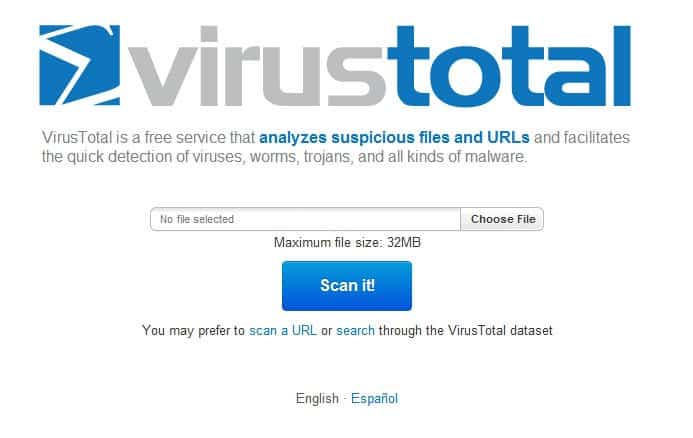
My go to service for scanning individual files online for malicious code is VirusTotal. It scans files that you upload to it with 42 different antivirus engines that include the majority of popular engines of the industry. Scanning usually does not take long, with results more often than not displayed near instantly after the file has been uploaded to the service. The file hash is generated and checked against the service’s database first before it is uploaded to check if someone else has uploaded the file to the service. This can save valuable time as there is no need to upload the file again if it has already been scanned previously. Virustotal can scan web pages in addition to files to provide people with safety information.
virustotal
A new blog post on the official Virustotal blog confirms that the service has been acquired by Google. The Virustotal crew will continue to operate the site independently for the time being while maintaining its relationships with antivirus companies and other industry experts.
An update from VirusTotal
 Our goal is simple: to help keep you safe on the web. And we’ve worked hard to ensure that the services we offer continually improve. But as a small, resource-constrained company, that can sometimes be challenging. So we’re delighted that Google, a long-time partner, has acquired VirusTotal. This is great news for you, and bad news for malware generators, because:
  • The quality and power of our malware research tools will keep improving, most likely faster; and
  • Google’s infrastructure will ensure that our tools are always ready, right when you need them.
VirusTotal will continue to operate independently, maintaining our partnerships with other antivirus companies and security experts. This is an exciting step forward. Google has a long track record working to keep people safe online and we look forward to fighting the good fight together with them.
More importantly, the company can now make use of Google’s infrastructure to provide a more reliable faster service for Internet users that use it. This likely means less downtimes, faster uploads and scans.
Google has not released an official statement yet, which means that we do not know anything about the companies intentions when it comes to the service. It is all possible: from shutting it down like Google did with Meebo to integrating it into Google products such as Gmail, Google Chrome, Chrome OS or Google Search, or using the information provided by the service to enhance Google products.
For now at least, Virustotal continues to operate normally. Lets hope that it stays that way.

Wednesday, 30 January 2013

AVG Antivirus Free 2013 download available


AVG Antivirus Free 2013 download available

By  on September 6, 2012 - Tags:
AVG Technologies today has released the annual update for their AVG Free Antivirus 2013 security application for Windows introducing new and improved features as well as a new user interface. AVG Anti-virus Free is one of the most popular free antivirus solutions for Windows PCs. It has grown in recent years from an application that was designed purely to protect the system from malicious software, to a program that does a lot more than just that. Critics say the program has become bloated because of that and there is certainly some truth to that when you look at the included modules:
  • Antivirus protection
  • Email Scanner
  • Linkscanner
  • Social Networking Protection
  • Do Not Track
  • Identity Protection
  • WiFi Guard
Good news is that you can disable several of the modules that you do not need during installation, so that they won’t be installed along with the core antivirus app. You can block the installation of the AVG gadget, personal e-mail scanner, identity protection and AVG Surf-Shield during installation.
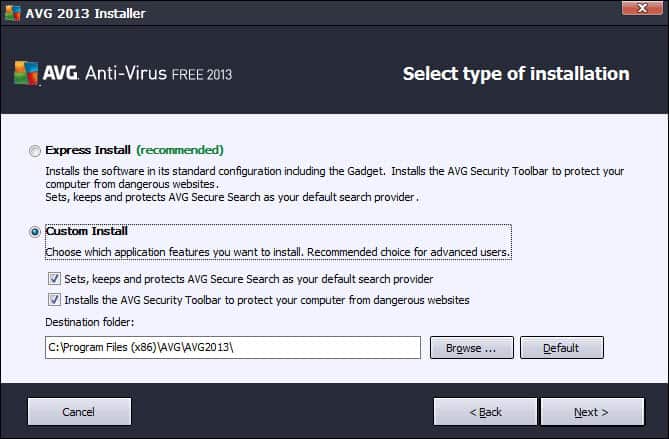
Bad news that the installer contains offers to install AVG Secure Search as the default search provider and the AVG Security toolbar in supported web browsers. To avoid this, select custom install and make sure the items are unchecked before you proceed with a click on next.
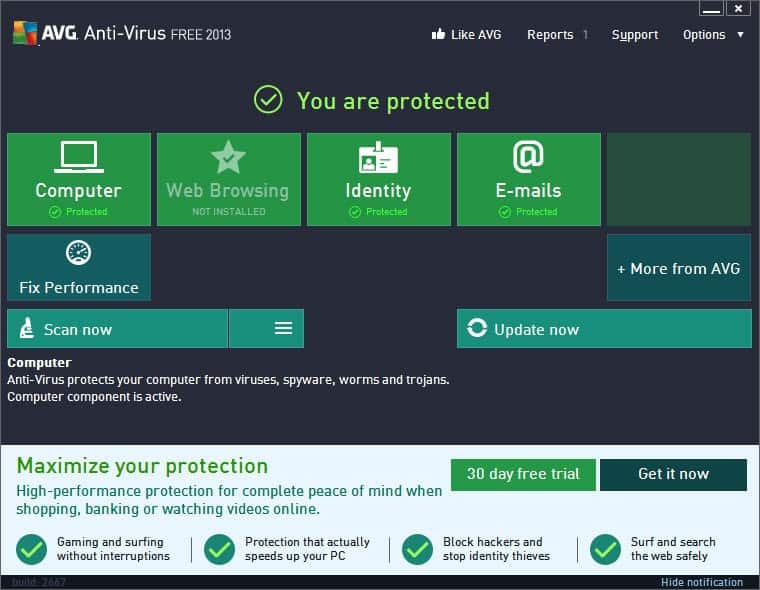
First thing you will notice when you start the program is the new user interface that displays the protection status and links to core program features.
avg anti-virus free 2013
You do find advertisement for the company’s own Antivirus 2013 and Internet Security scattered throughout the interface. About a fifths of the interface is reserved for ads that highlight some of the benefits of upgrading to one of the company’s commercial offerings. AVG thankfully included an option to hide that notification so that it does not get into your way all the time.
You will also find upgrade hints in various modules. The email scanner for instance highlights that spam protection is available in the commercial products on top of the email scanning of the free version.
So what is new in AVG Antivirus Free 2013?
We have previously mentioned that AVG Linkscanner has been discontinued and replaced by AVG Secure Search. The tool is available as a standalone download and also as part of the latest Antivirus free iteration. It is basically Linkscanner plus the AVG Security Toolbar, and – optional – changes to the browser’s default homepage and search provider. You can disable the inclusion by selecting the custom install option.
avg custom install
WiFi Guard is another new feature, which according to AVG, “helps you avoid rogue Wifi access points used by hackers by alerting you when your PC tries to access such a network”. Windows may connect your PC to a wireless network that you have been connected to in the past if it has the same name, even though it may not be the same network. WiFi Guard will recognize this for you and display a notification so that you have time to disconnect from the network. This module has actually been included in AVG 2012 updates.
Do not track is another feature that AVG introduced in a 2012 lineup update. It informs AVG users about data collected by Internet sites. The feature collects information about ad networks, social buttons and web analytics that you come across on the Internet, giving you options to block some or all of the scripts from your browser to protect yourself from being tracked by the scripts.
AVG Antivirus Free 2012 includes the following additional changes and improvements:
  • Reduced footprint while running when compared to the 2012 release
  • Better detection algorithm
  • File reputation, a cloud based service that improves the program’s detection capabilities
The program is a bit heavy on the notification side of things. You can disable some or all notifications, e.g. scan finished, under Options > Advanced Settings. Here you can also disable the boot time improvement notifications that you may see on reboots or new starts of the system.
Here is a video that is announcing the new version and the thought process behind it.

Download

AVG Antivirus Free 2013 is available as a web installer and offline installer. The web installer has a size of 4 Megabytes and will download the rest of the installation files from the Internet during installation. The offline installer is available as a 32-bit and 64-bit version, with a size of 118 Megabytes and 130 Megabytes respectively, that includes all components and does not require an Internet connection during installation.  Both versions can be downloaded on this page.

Processes

AVG uses several processes while running. You need to enable Show processes from all users to display them all. Please note that you may have additional or less processes depending on the modules that you have installed with the program:
  • avgcsrva.exe – the core scanning module, server part
  • avgemca.exe – the email scanner
  • avgidsagent.exe – the identity protection service
  • avgnsa.exe – AVG online shield service and resident shield service
  • avgui.exe – user interface, only process running under the user account
  • avgwdsvc.exe – watchdog service

Closing Words

The new interface is definitely  a step in the right direction, as are the options to block certain modules from being installed with the program. I’d highly suggest to use a custom install to remove all the security modules and offers that you do not want installed on your system.

Windows 8: The return of the browser choice screen


Windows 8: The return of the browser choice screen

By  on September 6, 2012 - Tags:, 
I had hopes that the EU would not force Microsoft to integrate the browser choice screen, or browser ballot as it was called, in its newest Windows 8 operating system. Why? Because it does not make sense. If you know about other web browsers, chance is high that you are already using a different browser as your default browser, and in this case, won’t get to see the browser choice screen anyway. If you do not know about other browsers, you won’t be able to make an educated decision about the browsers offered to you as you are only presented with a paragraph of text created by the creators of the browser. And while you could do some research to find the best browser for you, or pick one or multiple browsers from the list to test them out, it is likely that the majority of users won’t go through that length.
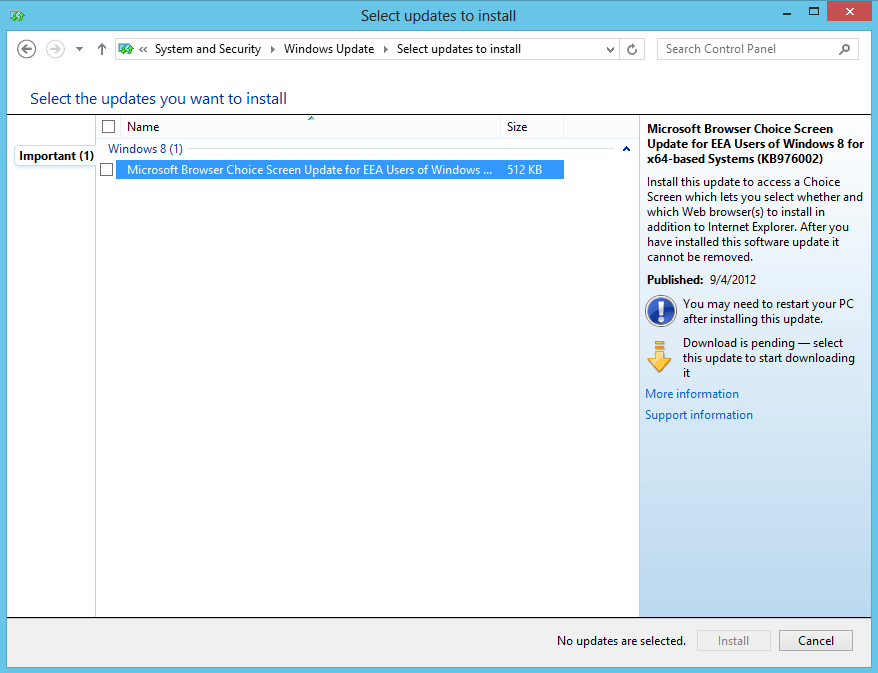
Anyway, if you have installed the Windows 8 RTM on a system and are currently residing in a country that is forcing this upon its citizens, then you will find an important update on Windows Update. The update does not get installed automatically, likely because it is being held back and unleashed once the final version of the OS comes out.
microsoft browser choice screen
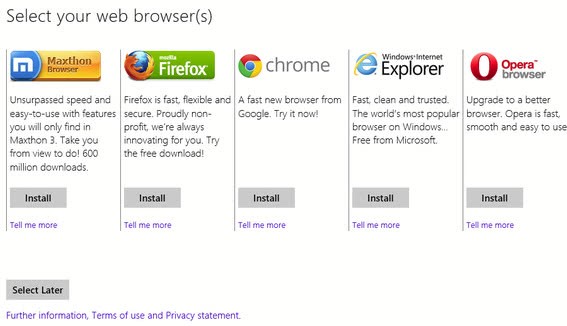
You can however install the update manually, and if you do and restart your PC, you will notice that the browser choice screen gets loaded on the next start. That is, unless you have installed  a program or tweaked the system to skip the start page on boot. If you did, you won’t see the options menu as it is a startpage app. What’s interesting in this regard is that it is possible to load Metro apps right on system boot.
browser choice
You can select to install any of the browsers offered to you – Safari is missing – click on tell me more links for additional information, use the select later button to not make a decision at this point in time, or close the window by click-dragging the window from top to bottom (or using Alt-F4). You can reopen the app at any time as it is linked on the start page and classic desktop for easy access., or remove that tile with a right-click and the selection of unpin from start.
Here are important information about the browser choice screen:
  • Browsers that you have already installed won’t be removed from the operating system when you select to install a different browser. It may happen that they are updated though. The update will however unpin Internet Explorer from the system’s taskbar.
  • Users in the following countries will receive the Browser Choice update: Austria, Belgium, Bulgaria, Croatia, Cyprus, Czech Republic, Denmark, Estonia, Finland, France, Germany, United Kingdom, Greece, Hungary, Iceland, Ireland, Italy, Latvia, Liechtenstein, Lithuania, Luxembourg, Malta, Netherlands, Norway, Poland, Portugal, Romania, Slovakia, Slovenia, Spain, Sweden, Switzerland
  • The browser descriptions may appear in English and not your native language if the creators of the browser have not provided Microsoft with a translated version for that language.
What’s your take on the integration of browser choice in Windows 8? (thanks Ilev for the tip)

Firefox: see if increased memory consumption is caused by addons


Firefox: see if increased memory consumption is caused by addons

By  on September 5, 2012 - Tags:, , 
Mozilla fixed most add-on memory leaks in Firefox 15, and while that is a good thing and all, some users have reported that they are witnessing the exact opposite, that Firefox 15 is gaining memory rapidly when the browser is in use. The majority of Firefox users should not see that behavior, but if you do, you probably would like an explanation why this is happening on your computer.
There are several – like always – explanations for this. While Mozilla did fix most add-on memory leaks, some remain, and you may have installed one add-on, or multiple add-ons, that still leak. This is for instance the case for the Scriptish add-on, a Greasemonkey fork, or the Speed Dialadd-on.
You have multiple options to find out if one of your addons is causing the leaks. Nicholas Nethercote notes that you can use the built-in error console for that. Click on Firefox > Web Developer > Error Console, or use Ctrl-Shift-J, to open it in the browser. Locate the filter at the top right and paste TypeError: can’t access dead object into it. If you see results, one of your add-ons is trying to access memory that has been cut by the browser. I suggest you work as usual for at least 15 to 30 minutes before you check for that to make sure the log is filled with information. Please note that this only reveals add-ons that started to leak after Mozilla implemented the memory improvements.
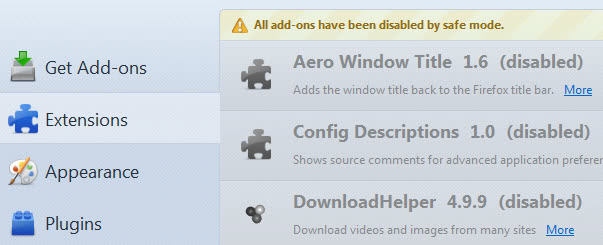
Another option that you have that requires a bit more of work on your side is to run Firefox without add-ons. The easiest way to do that is to start the browser in safe mode. For that you need to launch Firefox with the –safe-mode parameter. If you have the program pinned to your taskbar or startmenu, right-click it and select properties. Add the parameter to the end of the target field in the window. Firefox should now offer to start in safe mode. Make sure you accept that and not the reset option that is displayed as well. Firefox will start without add-ons, themes and other modifications.
safe mode disable addons
Monitor the browser’s memory usage afterwards for a while to see if it stays on a normal level. If it does, one of your add-ons is the culprit. To find out which, you need to start Firefox in regular mode again, disable all of your add-ons, and enable them one by one to see which is causing the issues. You could try a divide and conquer strategy instead, enable half, disable half, to speed up things.
But there is a second reason for high memory usage in Firefox. Web services like Google Readermay also be responsible. Several Firefox users have reported that Google Reader is causing the memory to increase over time when it is open in the browser. If you are using Google Reader regularly, you may want to make sure to close and re-open the tab regularly to avoid this from happening, if you are affected.