Friday, 25 January 2013

DiskCheckup: get warnings before a hard disk drive fails


DiskCheckup: get warnings before a hard disk drive fails

By  on August 17, 2012 - Tags:
A failing hard disk drive can have severe consequences for the data that is stored on the drive. In the worst case, you end up with an unusable hard drive and data loss that even the best recovery programs can’t restore.  While backup software can prevent data loss from happening in the first place, you may also appreciate warnings before a hard disk drive connected to your computer fails.
One of the programs that you can use for the job is DiskCheckup, a free for personal use disk monitoring software for the Windows operating system.
hard drive monitoring
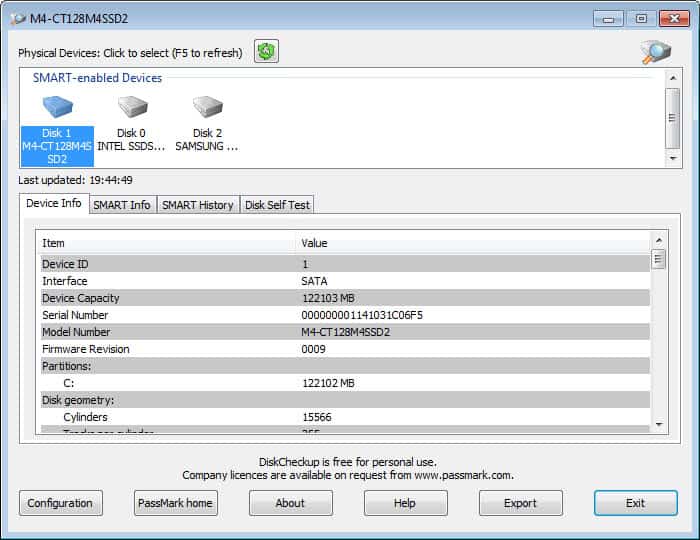
The program displays all hard disk drives in its interface on startup. The lower half of the screen gets populated with information once you select one of the drives at the top. Information are sorted into the following four tabs:
  • Device Info lists the capacity, interface, model number, firmware and other device related information including the drive’s standards compliance.
  • SMART Info displays information about the health of a drive. Here you find information about the current and worst temperature, or error rates, and status information for each value that informs you if the drive is still running within limits.
  • SMART History is deactivated by default. You first need to activate the feature in the program settings. Please note that the data file can grow significantly in size. It is therefor suggested to only activate this feature temporarily.
  • Disk Self Test offers to run a short or extended test and displays the status of that test afterwards.
You need to enable the warning system with a click on the configuration button. Here you can define a temperature warning level, and configure whether you’d like to see a message window or receive an email when values exceed the threshold.
You need at least one hard drive with SMART functionality to use the program, and need to know that drives connected via SCSI or hardware RAID are not supported.

Improve your text reading speed with Speed Reader Enhanced


Improve your text reading speed with Speed Reader Enhanced

By  on August 20, 2012 - Tags:
Remember those movies where a genius is reading each page of a book in a few seconds? While average readers probably never get that far when they start to improve the speed in which they read text, it is certainly possible to learn how to read faster without sacrificing the meaning of the text. So called speed reading programs aid you in improving your text reading speed by gradually increasing the words per minute count in practice sessions.
Speed Reader Enhanced is a free program for the Windows operating system that is available as a portable version or installer. When you first start the program you see a settings page where you configure the program’s features. It is here that you select the words per minute and word interval as well as the text that you want to read or use for practice. The author of the application recommends that you start with a words per minute count that you feel comfortable with before you increase the count gradually over time. Depending on your reading experience, the word count of 300 per minute may be too fast to start with.
speed reader enhancer
I’d suggest you try it out and reduce the words per minute count if it is too fast for your. The settings page lets you change the background color and text color as well as the font the text is displayed in as well. You can furthermore change the minimum number of characters displayed to you per interval, whether you’d like the program to combine small words, and if you want the program to make small pauses after periods and commas.
You can use the default text for the configuration phase, or load a pdf document or text file from the local computer system instead. A click on Show Reader opens the interface in full screen, and a tap on any key but the ESC key starts the speed reading exercise. You can hit ESC at any time to switch to windowed mode, pause with any key, and go back to the settings page with another tap on the escape key. The program saves the position whenever you pause, so that you can continue at the same position when you start again.
improve text reading speed
You find a speed reading course pdf document in the program folder that explains some of the concepts and ideas behind speed reading. If you have never come into contact with the concept before, it is probably a good way to start.
All in all a great program for Windows users who want to improve their text reading speed.

Put.io: downloads torrents for you, lets you stream or download afterwards


Put.io: downloads torrents for you, lets you stream or download afterwards

By  on August 19, 2012 - Tags:
If you can’t run a Bittorrent application on your local computer system, either because you are not allowed to install any software on it, or maybe because your Internet Service Provider is limiting bandwidth for P2P file transfers which would make the downloading less enjoyable and slow, you may be interested in an online service that does the downloading for you.
Put.io offers to download torrent files using their servers. All you need to do is supply the service with the torrents you are interested in, wait until the files have been downloaded, to either download the files to your computer or stream media files directly.
A free account is good for 1 Gigabyte of storage space and unlimited bandwidth. If you need more, you can upgrade to pro or premium accounts that increase your storage to 50 or 100 Gigabytes for $9.90 or $19.90 per month respectively. You can refer other users to the service to get an additional 350 Megabytes of storage space up to 3 Gigabytes in total. The system works similar to Dropbox, and you can invite by email, social media or with direct links.
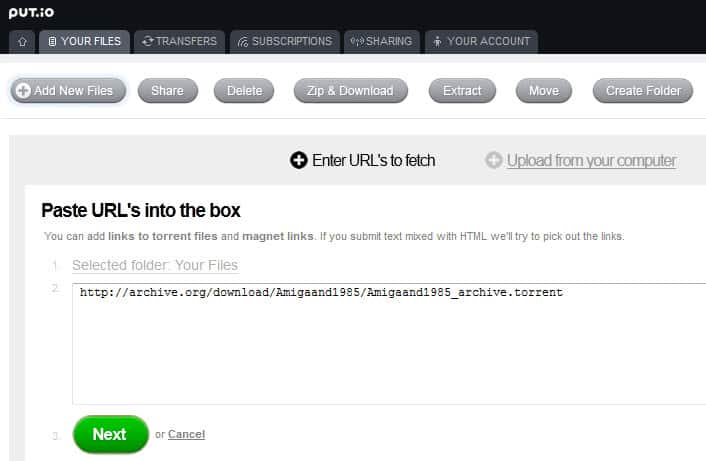
The whole process of adding and download or streaming files is surprisingly easy. To start, you click on add new files on your user home page, and either paste torrent file links directly into a form on the page, or upload torrents from your computer instead.
download torrents online
The service checks the torrent file and its storage requirements on the next page and gives you either the green light to start the transfer, or the red light if downloading the files would exceed your storage space. What’s missing is an option to select individual files that you want to download from a torrent. This is especially true for archive.org torrents which often come with multiple versions of the same file.
Put.io checks if the torrent has already been downloaded by another user of its service, and if that is the case, makes the file available to you directly after a few seconds. If the file has not been downloaded yet, you are redirected to the transfers page where you will see connection and progress information.
Once the service has downloaded files for you, you can access them from the your files menu. Options available here include zipping and downloading files to the local computer, extracting zipped files, sharing files with friends, or deleting files. When you click on a media file, you are automatically taken to a streaming video page so that you can watch the video online without downloading.
stream torrents online
Options to stream using a local player and to download the file are present here as well. The subtitle search feature is a nice addition as well.
The operators of the site and dedicated users have created tools that improve the service’s accessibility. You find plugins and apps for XBMC, Plex and Boxee here, as well as Chrome extensions, options to map the storage to a local drive letter or instructions on how to use the mobile version of the platform for use with smartphones and other mobile devices.
Another interesting feature is that the service supports RSS subscriptions. All new torrents that get released will be automatically updated once you have added a subscription to your account, provided you have enough free storage space available for that.
Put.io works pretty well and has a lot to offer. Especially the easy to use interface, the third party tools and the option to stream media right from your account need to be mentioned in this regard.

Thursday, 24 January 2013

Opera crashing or freezing? May be out-of-process plugins


Opera crashing or freezing? May be out-of-process plugins

By  on August 16, 2012 - Tags:
Opera Software introduced out of process plugins in Opera 12.00 to increase the browser’s overall stability when plugins were used to display contents on web pages. The basic idea behind out of process plugins is to move plugins in their own process so that they do not affect the web browser itself when they crash, freeze or cause other issues.
If you have been experiencing stability issues like crashes or freezes in Opera 12.0x recently you may want to try and disable out of process plugins to see if it resolves the issue when using the browser. A recent Opera Desktop Team blog post reveals that Opera Software noticed an increase in Opera freezing on pages with plug-in content on the Windows platform.
The out of process plugins feature seems the culprit, and Opera recommends to disable the feature in the browser for the time being until a proper fix is released in one of the future versions of the web browser. The issue is only affecting Windows versions of the web browser, with Mac and Linux users not experiencing the issues in their versions.
Whenever you open a web page with plugin contents, you will notice the opera_plugin_wrapper.exe process pop up on your system. It is this process the plugins are running in.
opera out-of-process plugins
There does not seem to be a way to disable out-of-process plugins in the web browser directly. I could not find a setting to do so in the regular options nor under opera:config.
The only available fix as of now is a new Opera 12.02 snapshot build in which the developers have disabled the out of process plugins feature. Please note that this is only true for the 32-bit version under Windows. The reason why the feature is not deactivated in 64-bit versions of Opera is that these versions require the feature to run 32-bit plugins.
So, if you run a 32-bit Windows version of Opera and experience crashes or freezes, you may want to download and install the snapshot build to see if it resolves the issue. Keep in mind that it is a development build and not necessarily suitable for productive environments.
You can alternatively try and enable on-demand plug-ins in Opera. Click on Opera > Settings > Preferences to open the configuration window. Switch to Advanced > Content and check the enable plug-ins only on demand option there.  This may block some plugin content on websites, advertisement for instance, which in turn may reduce the chance of Opera freezing or crashing because of the issue.

Firefox for Windows 8 making progress, no Flash in sight


Firefox for Windows 8 making progress, no Flash in sight

By  on August 15, 2012 - Tags:
Okay so Mozilla is moving ahead with Firefox as an app that you can run on Windows 8′s start page just like any other app you can install from the store. The developers currently aim for a first release preview in this quarter of the year, and a beta release in the fourth. This alone indicates that the Firefox app will not be ready when the new Microsoft operating system gets released come October 26.
Brian Bondy’s latest report highlights some of the recent additions and improvements that the team implemented into the Firefox app for Windows 8. Among the improvements are the inclusion of the pdf.js PDF viewer that works without plugin, better handling of mouse input, various keyboard shortcut support and other minor feature additions to the browser.
The initial release will not support add-ons, one of the browser’s strongest selling points. But support will be added to a later version, so that all add-ons that support the Add-on SDK will be compatible with the app version of the Firefox browser. The change has no impact on the desktop version of Firefox.
firefox metro windows 8
The Firefox app will support syncing data with the desktop interface, although it is not clear at this point in time what you will be able to synchronize. The team is currently waiting for a single bug to be completed before the builds are merged with Mozilla-Central.
Mozilla has not yet addressed the Flash issue as I’d like to call it. Both app versions of Microsoft’s Internet Explorer 10 and Google Chrome support Flash natively, giving them an edge over browser apps that do not. While that may not be a deciding factor for all Windows 8 users, especially since it usually just takes a click to switch to the desktop version, missing Flash support could irritate users who have made Firefox the default browser on the system. If their favorite sites stop working because of it, it may lead to users switching to another browser that does not have that issue. It is certainly too early to tell how big of an issue that will become.
Do you think that the disadvantage could affect the browser’s market share as a whole?

Mozilla adds old Java plugins to blocklist

By  on August 14, 2012 - Tags:
Mozilla maintains a blacklist for add-ons and plugins that are either a security risk for users of Mozilla products they are compatible with, or cause stability issues when they are installed in a product. The blacklist acts like a global filter that blocks plugins and add-ons on it from being run in the Firefox web browser or other Mozilla products.
Today Mozilla announced that it has added old Java plugin versions to the blocklist to protect users from a critical vulnerability. The vulnerability is present in older versions of the Java Development Kit (JDK) and the Java Runtime Environment (JRE). To be precise, it is affecting the Java plugin version 6 update 32 and earlier, and the Java plugin version 7 update 4 and earlier. All newer versions are not affected by the vulnerability as it has been fixed in both products with the June 2012 update.
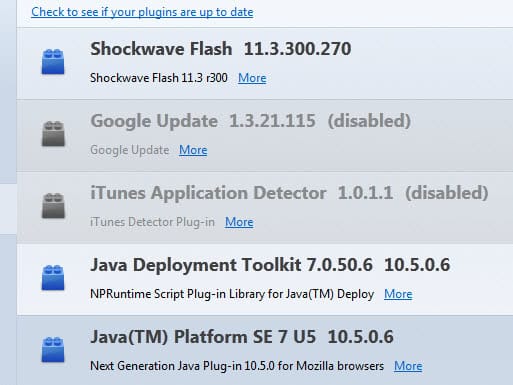
Firefox and other Mozilla product users are asked to check their version of Java to make sure the plugin is up to date. This is done by loading about:addons in the browser, switching to plugins on the left sidebar, and looking for Java plugin versions there. Another option is to open the Mozilla Plugin Check website to verify the installed Java version this way. The plugin check service works with other browsers as well.
java vulnerability firefox blocklist
Affected versions of the Java plugin are automatically disabled, unless users actively choose to keep the plugin enabled despite the risk  of being targeted by exploits of the vulnerability. Firefox users can however enable or disable the plugin at any time in the add-ons manager.
New versions of the JRE can be downloaded from the official Java website. Mozilla recommends to update Java as soon as possible and disable the plugin in the meantime to protect the browser from exploits.
You can read the full announcement here at the official Mozilla blog. You can access a list of plugins and add-ons that have been added to the blocklist here.

Tuesday, 22 January 2013

Open Source Cars? Yes it works and the cars look great


Open Source Cars? Yes it works and the cars look great

By  on August 13, 2012 - Tags:
When you think of open source, you probably think of software first and foremost, and maybe about open source devices as well. While it is linked mostly to software, Open Source is not limited to that field at all, as it is also a design philosophy.  But an open source car? How would that even work?
Take the site Local Motors for instance. It is an open source community of car designers, enthusiasts, engineers, modelers and fabricators who work in tandem to create the next generation of automobiles. Community members submit sketches, designs and ideas with the most popular ones rising to the top thanks to the site’s community voting system.
The first car that that the company made came from a design of Art Center College of Design student Sangho Kim. The Rally Fighter is a street legal vehicle designed for off-road fun. It features a 6.2 liter V8 engine, 430 horsepower, and comes with a set of optional features that customers can buy on top of the regular car.  A comfort package sets you back another $3200 for instance, adding full carpet and navigation, leather trim accents, full integrated back up camera and power windows and door looks to the car.
open source car rally fighter
That is on top of the $74,900 that you pay for the car. What’s interesting here is that you not only get the car for the price, but also what Local Motors calls a Total Build Experience. You have to build your own car. That may sound intimidating at first, especially if you do not have any experience in doing so. But Local Motors assists you with a team of experts that help you through the process. According to Local Motors, the process is open to long time car builders and first time builders, and all that is needed is at least one additional person to help you build the car.
The Rally Fighter is just the first in a line of vehicles and improvements created by the community. You can check out the Forge for ongoing projects and competitions