Monday, 21 January 2013

Facebook Stories launched


Facebook Stories launched


The idea behind Facebook Stories is simple: Some of the 950 or so million Facebook users, minus the ten percent fake accounts, must have used the site for something deeper than playing games, listening to music or posting status updates. It appears to be an attempt to prove that Facebook is more than that, and that the site can be used for life-changing extraordinary activities as well.
If you now thought that you would only see celebrities lined up on the Stories website then I have to tell you that you are wrong about that.  When you look closely, you will notice that the bulk of stories are about regular people that happen to be Facebook users. There is a story about a Facebook group from Guelph Ontario that tries to save a landmark building in the city, and one from a user who lost all of his memories after an accident who is using Facebook to piece together part of his past life. If you are particularly interested in these kind of stories, then you will feel right at home on the website.
facebook stories
Facebook obviously has its own agenda when it comes to the site, and if you think that all the posted stories make Facebook seem kinda great, then you may have found the core reason for the site’s creation. While marketing certainly has played an important role in the creation of Facebook Stories, there may be more behind the site than that.
Facebook for one zooms in on particular members of the site, or groups, and puts them into the spotlight, something that the company has not done before in large scale. This may help some of the users or groups to get the publicity they need to succeed.
Facebook plans to offer monthly features as well on the site. Each month an author will highlight books that fit the month’s theme, and a musician will make available a playlist on Spotify.
All Facebook users are invited to submit their stories to the site, as long as it includes an extraordinary way Facebook has been used. Good stories like finding your long lost dog companion after ten years on Facebook via the site’s people you know feature may then be featured on the Facebook Stories website where they are made available to a large audience.

PNG Gauntlet: compress png images without quality reduction


PNG Gauntlet: compress png images without quality reduction


When you make available images on the Internet, be it embedded on a website, in documents, or by sending images as email attachments, you and the target audience often benefit from reduced file sizes. Webmasters may benefit from a fast optimized website in several ways, from improved click through rates to less visitors who close the tab before the full website has been been loaded. It also reduced the bandwidth the site needs to deliver its contents to its visitors. Bandwidth and time are also the factors when it comes to documents, email attachments and other forms of making images available to other users.
We have covered several automated solutions in the past. From the Thunderbird extensionShrunked Image Resizer, the WordPress plugin WP-Smush It to desktop applications to optimize images for websites and other purposes.

PNG Gauntlet

PNG Gauntlet is a desktop tool for Windows and Mac – the Windows version requires the Microsoft .Net Framework 4.0 – that can reduce the size of png files without reducing the image’s quality at the same time. It combines three different tools for the purpose to create the smallest possible file size. What about other image formats? If you want, you can have them converted to the optimized png format.
The interface provides you with all the settings that you need to get started. Before you do, I’d suggest you click on Tools > Options to make sure everything is set correctly here. If you plan on working on the PC while the program compresses the images, you should consider checking the run compressors with low priority box to avoid slow downs on the system. Depending on your system, you may also, or alternatively, uncheck the preference to compress multiple files at once.
png gaunlet resize images
When that is out of the way you need to add an output directory where the optimized images are saved to. You can alternatively overwrite the existing files, but since you do not have an option to compare results, I’d suggest you do not the first times you use the program. Images can be dragged and dropped individually, in bulk or as folders into the interface.
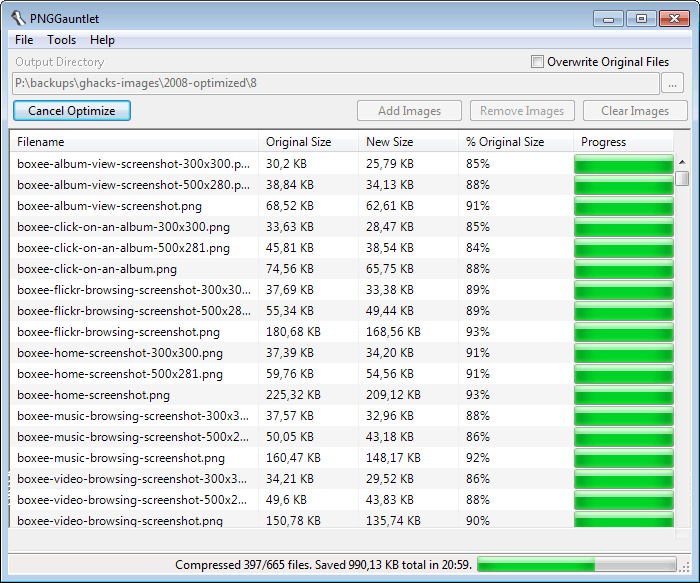
A click on optimize runs the optimization of all images that you have added, and PNG Gaunlet will display the old and new image size, as well as the reduced size in percentage on the screen. In the status bar you find the total size that was saved by the operation, as well as information about the status of the operation. As you can see from the screenshot, the program is not the fastest. If you want fast, you should take a look at Riot instead which I have linked above. The program may not create the smallest file, but it does not take that long to get the images compressed and the difference is not that big that you can’t make use of it.
Still, if you want the maximum then PNG Gauntlet can get that extra percentage off of the image size.

Last Pass password manager gets two new security options


Last Pass password manager gets two new security options


I have used LastPass for quite some time before I made the switch to the KeePass password manager. While I have not regretted that move, I know of several users who are using LastPass for all their password management needs.
LastPass supports a wide variety of features that make it more than a replacement for the built-in password manager of the web browser. This includes a secure password generator, note taking, access from web browsers and the LastPass website, browser synchronization and automatic form filling.
The premium version adds mobile client support and multifactor authentication to the client usingYubikeys or USB thumb drives.
Two new security features have been added to LastPass accounts yesterday that improve the security further.  Both features are available in the account settings dialog which you can open from the LastPass vault.
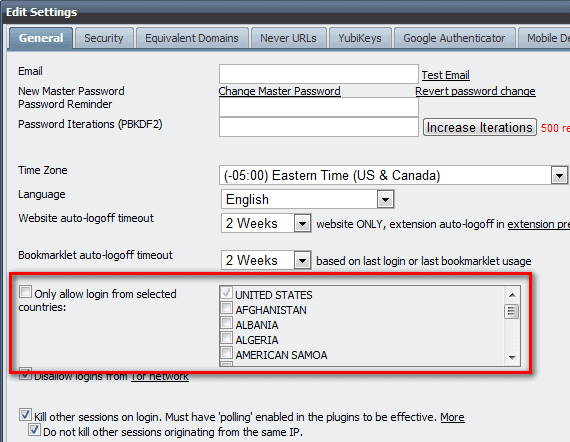
The first security feature restricts the LastPass login to countries that you select in the settings dialog.  Once you have made your selection here, and most LastPass users without doubt will only select their home country, log ins are only permitted if the IP address resolves to a location in that country.
lastpass security
If someone else steals the login and tries to log in from another country that log in will not be permitted even if the login credentials are correct. While there are options to bypass that limitation, for instance with the help of a VPN service, it may block a percentage of attackers from investigating the error message or trying to get into the account. You do however need to make sure to change the country selection before you travel to another country if you want to use LastPass there. This can be a temporary addition for a business trip, or a permanent one if you move to that country.
The second feature disables log ins from the Tor network. It is obviously not a good idea to block logins from the Tor network if you use it yourself. If you never use it however, you can block it to prevent hackers from using it when they try to access your account.

Opera 12.01 security and stability update released


Opera 12.01 security and stability update released


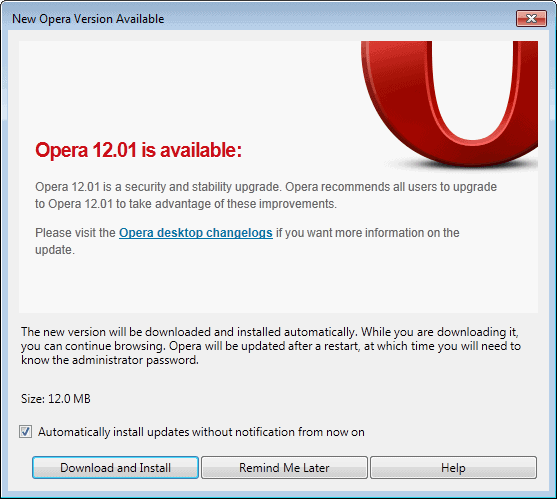
Opera Software just a few minutes ago has released an update to the desktop version of the Opera browser. Opera 12.01 is a security and stability update that falls in line with the company’s previous update cycle that iterates between larger and smaller updates.
Existing Opera 12.0 or earlier users can run an update check in the browser to download and install the latest version of it automatically. This is done with a click on the Opera button, and the selection of Help > Check for updates from the menu that opens up. The browser will eventually pick up the new version automatically to offer an automatic update without manual check.
opera 12.01
New and existing users who do not want to update the browser using the built-in updater can download the latest version from the Opera website instead. It is offered as usual for all supporting operating systems and languages.
The changelog lists several fixes and enhancements that have made their way into Opera 12.01. Here is a selection of important ones:
  • General fixes and stability improvements
  • Website thumbnail generation memory improvements
  • Fixes for issues on sites and services such as Twitter, Google Maps Labs, Yahoo Chat, Lenovo’s Shop now page and Tuenti.com.
  • Various display and scripting bug fixes
  • The browser’s address bar inline auto-completion is no longer preferring the shortest domain
  • Fixed a crash when mail databases were loaded on startup
  • Resolved a favicon display issue when too many tabs were open in the web browser
The new version on top of that patches several security vulnerabilities in Opera 12.01, of which some can allow attackers to execute code on the target system. You find additional information about the security fixes linked from the official changelog. Mac and Linux users need to navigate back to the main changelog directory to access the log for their operating systems.

Sunday, 20 January 2013

Keep Your PC Clean With Wise Disk Cleaner


Keep Your PC Clean With Wise Disk Cleaner


Some computer users say that there is not really a need to run disk cleaners like the popularCCleaner or the lesser known FixBee regularly on a system thanks to Terabyte-large hard drives. And while that may be true in some cases, it may not be true for all. Users with Solid State Drives built-in their computer for instance will have a couple hundred Gigabytes tops on that drive available, which can get filled rather quickly with games, large applications, or media.
Wise Disk Cleaner is a free program for the Windows operating system that PC users can make use of to remove unnecessary files from their system that take up disk space. The program uses a clean interface that is divided into three tabs at the top.
wise disk cleaner
The Common Cleaner tab resembles CCleaner’s functionality. It is basically a list of locations where temporary files or files that leave traces are saved in. A click on a group opens up a detailed selection list. You find the usual file locations listed here, from web browsing cookies and history information to temporary file locations that Windows uses automatically.
The list is nowhere near as comprehensive as that of CCleaner, but it covers many major locations. It needs to be mentioned that only Internet Explorer, Firefox and Google Chrome are covered by the cleaner.
The Advanced Cleaner basically searches select hard drives for temporary file types, invalid shortcuts and empty files, and offers to remove them.  It is possible to add custom file extensions here to have them included in the cleanup automatically from that moment on.
Wise Disk Cleaner offers to run these two cleanup modes manually or on schedule. It is for instance possible to run an automatic cleanup once per week.
The Slimming System options offers interesting options to cut down on the size of the Windows installation folder. Here it is possible to remove components that you may not use at all. This includes Windows Help files, language packs, or the Windows Installer Baseline Cache which usually has quite a large file size.
On a one month old installation of Windows 7, the slimming system option offered to free up 1.3 Gigabyte of disk space.
The program settings offer some interesting options. You can first add folders here that you want emptied regularly. Whatever is in that folder, will be cleaned by the program when you run it. You can furthermore add folders to the list of exclusions, so that they are not targeted by the cleaner at all, and have the program create a one-click shortcut on your system to run cleanups manually with a click on that shortcut. Non-SSD users can furthermore enable secure deletion here to make the data unrecoverable after deletion.

Closing Words

Slimming System feels like a genuine feature, especially since it usually frees up more disk space than the other cleaning options. This feature sets it apart from other cleaners that do not offer it.  Please note that you can download a portable version of the PC cleaner by clicking on the Alternate Download link on the program website.

How To Prioritize File Downloads In uTorrent


How To Prioritize File Downloads In uTorrent


When you load a torrent with multiple files into the uTorrent Bittorrent client, you will notice that uTorrent by default will not prioritize any file in particular. While that may not be an issue most of the time, especially not if the torrent is well seeded. There are however situations where you may want to prioritize files in the program, for instance when you download a media file that you want to preview this way. You could do that by downloading the beginning of the first file right at the start, to preview the media file that way.
Another reason for downloading files in priority is if you want to have them available at the very earliest moment. Instead of download files left and right without order, you might want to download files one by one instead so that you have the complete file on your hard drive. This may be important for accessing as soon as possible, but also if you fear that the original seeder might shut down the seeding. Instead of being left with incomplete files, you would have at least some finished files on your computer.
The Bittorrent client uTorrent offers several configuration options, some automatic, some manual, that you can use to prioritize file downloads in the client.
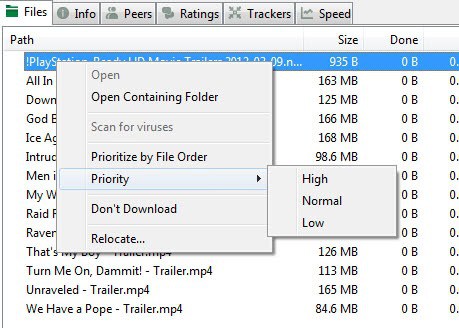
Probably the biggest option that you have at your disposal are only available manually, unfortunately. You can highlight specific files in a torrent and change their priority. The client by default supports the three priority ratings high, normal and low, which you can increase to 15 with a click on Options > Preferences > UI Settings > Use fine grained file priorities.
utorrent prioritize by file order
The second option, still manual, is the Prioritize by file order option that you see in the screenshot above. This basically prioritizes downloads based on the order of files in the file listing. If you select all files, uTorrent will try and complete the first file before it jumps to the second, then third, and so on. There is unfortunately no option to automate this setting in uTorrent.
bt.prioritize_first_last_piece
Open the preferences again, and select Advanced this time. Here you find several advanced configuration options. Locate bt.prio_first_last_piece here and set its value to true. This is an automatic setting that makes uTorrent prioritize the first and last piece of a file over everything else. Keep in mind that this does not necessarily mean that the whole file will be prioritized. It is mainly there to provide users with a way to preview media files as soon as possible.

4 Options To Find Great Free Domain Names


4 Options To Find Great Free Domain Names


So you have decided to create a new website, be it a personal blog, a website for a local sports club, or a new web service that you are about to launch. The only thing missing is a domain name, preferably short and up to the point. But no matter how hard you think about it, you do not come up with a fitting name that is still available. The following four options may aid you in finding next-to perfect domain names for your projects.

1. Expiring Domain Names

It is first necessary to distinguish between expiring and dropped domain names. Expiring domain names are still registered by someone, who has not yet paid the yearly fee to keep in possession of the domain name in question. Dropped domain names have expired already.
Lots of services are available on the Internet that auction off or sell dropped or expiring domain names. Here are a few places to get you started.
  • Namejet – Pretty big site that offers detailed search options to find the domains you are looking from. From entering a term that you want included to filtering out domain names by extension, category, and the maximum number of characters.
  • Godaddy Auctions – Auctions for sites expiring at one of the largest domain registrars in the world. Filters are pretty good, and you get additional information like traffic information or valuations.
  • Just Dropped – Offers to display results from multiple registrars, again with extensive options to filter the results listing.
Expiring domains can be a great option if all suitable domain names have been registered already. While you still need to be lucky to find a suitable one here, it offers a chance to get a great domain name for a small price. Keep in mind though that you should background check the domain name before making an offer. This includes finding out what was offered on the domain before, and whether the webmaster or a SEO agency ran campaigns that may have got it penalized in the search engines.

2. Domain Name Suggestion Tools

These online tools generate domain names based on terms that you enter. Some may let you add prefixes, suffixes or other optional terms as well.
  • DomainsBot – Enter a main word and synonyms and wait for the results listing to be populated with options. The service can search Sedo and Godaddy for you, or only display domain names that you can register right away. Additional options include selecting TLD extensions, using prefixes and suffixes, different languages, and specifying the domain length.
  • Domainit – Enter one or multiple keywords, select domain extensions, the maximum length, and whether you want the service to add its own suggestions to the resulting domain names.
  • Ubersearch – Enter a search term or phrase and get suggestions displayed on the same page. You do not have as many options as the other two services offer, but it is pretty fast and displays the availability right away on the screen.

3.  Buy a domain name

If a domain name is not available, you can try and contact the current owner to broker a deal. This obviously won’t work for domain names like Google, Amazon or Microsoft, but may work for domain names not in the possession of large organizations.
flippa
Instead of contacting the owner directly, you may also try your luck at sites where you can buy domain names and web projects directly.
  • Flippa – Probably the biggest site of its kind. On Flippa, you find domain names and web projects. Most websites on offer are sold in auctions, while you may find some listed for buy it now prices or no price at all (which means you must negotiate). The popularity of the site means that many sites will be priced on the high-side of things. Not broker-high, but still pretty high.
  • Namepros – A webmaster community forum with a strong focus on domain names. You can buy domain names here, get appraisals and domain related news.
  • Sedo – A domain market for domains without content and web projects. It is one of the most respected marketplace in this vertical, and often pretty expensive.

4. Get Personal Recommendations

You can ask friends, family and co-workers for suggestions, and while that may sometimes result in you finding a great domain name that you did not think about before, you more often than not won’t. Recommendations can however come in other forms.
  • Picky Domains – For a fee of $50 you can ask users on the site to provide you with domain name suggestions. The winning user gets part of the money, while the site operators get some of it as well. It is important to use a good description and enter keywords that you find suitable for the site. You can furthermore select domain extensions, the maximum length and other factors.
  • Squad Help A similar service with more pricing options and fees on top of it.  Service begins at $50 plus a fee of $39. You can take a look at active naming contests, which usually receive more than 100 entries.

Closing Words

Finding a suitable domain name for a new project can be a time-consuming task, especially if you want it to be perfect, and not just suitable for the project. One thing that I often do is to get a list of about five suitable free domain names, and ask close (webmaster) friends to pick their favorites. It is still up to you though to make a decision in the end.
Are you using different tolls or web services to find free domain names?